Chipset
This will select which Custom Chipset to use for emulation.
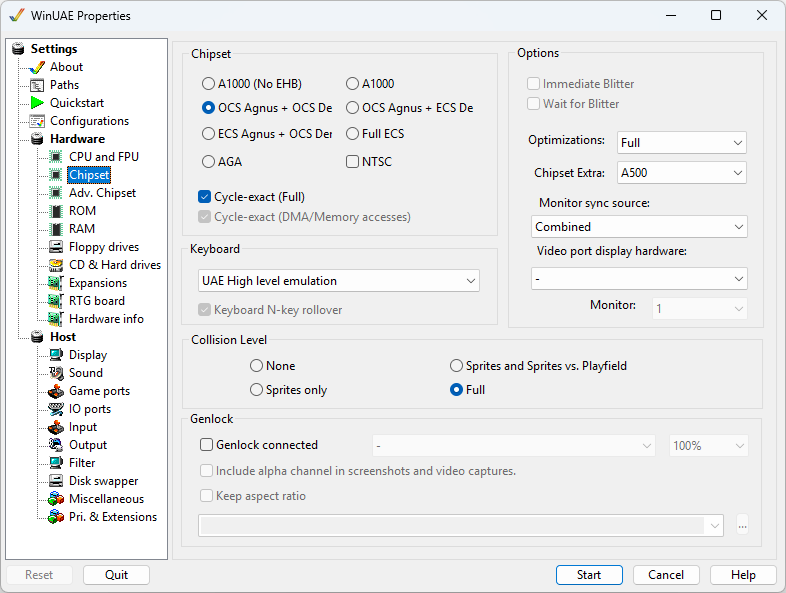
Chipset
- A1000 (NoEHB): First Amiga A1000 with OCS chipset but no Extra Half Bright mode.
- A1000: A1000 with OCS chipset.
- OCS Agnus + OCS Denise: This was the first or original chipset, used in the Amiga: Agnus 512K, Denise (32 color graphics, HAM mode).
- OCS Agnus + ECS Denise: This is a mixed chipset, used in the Amiga: Agnus 512K/1M, ECS Denise (Prod VGA, SuperHiRes modes)
- ECS Agnus + OCS Denise: Uses enhanced Fat Agnus which supplies 1MB of Chip RAM and original Denise graphics chip.
- Full ECS: This was the next generation of Amiga chipsets. Compared to OCS, they provided higher resolutions, but no expansion of the color palette.
- AGA: This is the latest and most advanced chipset with 256 colors, HAM-8 mode (262K colors).
NTSC Enables US NTSC screen mode (200 lines). The default is PAL (256 lines).
Cycle-exact (Full) The most compatible A500/A1200
emulation mode, needed by some games and demos. It requires
a fast PC.
Cycle-exact (DMA/Memory accesses). Enables
cycle exact chipsets just for Direct Memory Accesses or normal
memory accesses.
Keyboard
Keyboard Selects the emulated keyboard: none (Keyboard
disconnected), the default UAE High level emulation, or an
exact emulation of the keyboard of a specific Amiga model,
which needs the matching keyboard ROM.
Keyboard N-key rollover Lets you press many keys at
once, even if the selected keyboard model could not handle
that.
Options
Immediate Blitter Does requested blits immediately.
Wait for Blitter Wait for the Blitter to
complete operations.
Optimizations Full, Partial or None. Leave this at
Full, the other settings are slower and only meant for
testing.
Chipset extra: List of Amiga models to choose
to select appropriate chipset automatically.
Monitor sync source Selection of Combined,
Composite Sync or H/V Sync.
Video port display hardware Selection of
Autodetect, A2024, Graffiti, Black Belt systems HAM-E, HAM-E
Plus, Video DAC 18, AVideo 12 or 24, Firecracker 24, DCTV,
OpalVision or ColorBurst.
Monitor. Multi-monitor selection (default: 1
of 1-4).
Collision Level
- None No collision detection used.
- Sprites Only Collision detection between sprites only enabled.
- Sprites and Sprites vs Playfield Collision detection between Sprites and background graphics.
- Full enables all levels of collision detection.
HINT: Full is not recommended because it causes unnecessary performance loss, and it is just very rarely needed.
Genlock
Genlock connected Specifies whether a
Genlock (generator locking) device is connected. A Genlock is
used where the video output of one source, or a specific
reference signal from a signal generator, is used to
synchronize other television picture sources together.
Genlock type Specified type of Genlock: Noise,
Test card, image file, Video file, Capture device, American
Laser Games LaserDisc Player, Sony LaserDisc Player, Pioneer
LaserDisc Player.
Percentage of lock between sources.
Include alpha channel in screenshots and video
captures.
Keep aspect ratio Keep source width and
height.
Genlock file Image file or video file to
use.