ROM
These settings control which ROM image(s) WinUAE will use. At least a Kickstart ROM is required to emulate a classic Amiga.
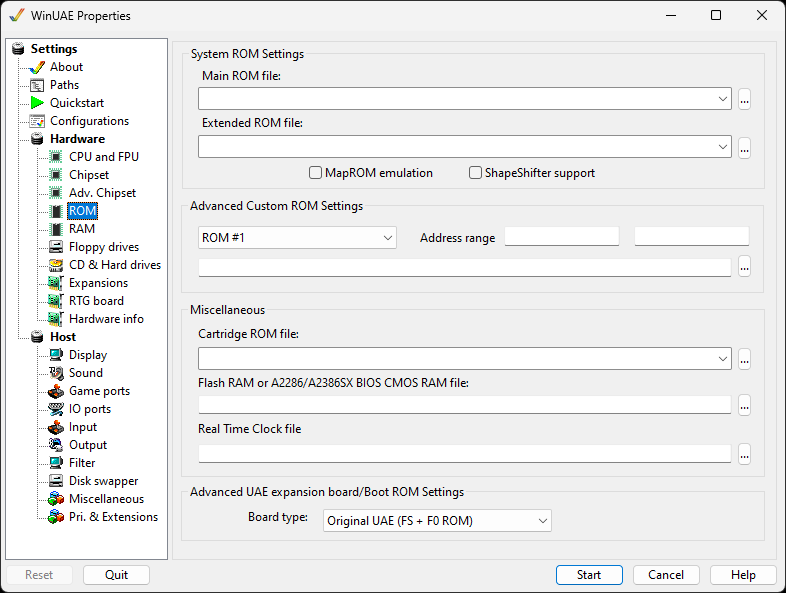
System ROM Settings
Main ROM File specifies which Kickstart ROM
file to use. ROMs in the specified path will be automatically
detected.
Extended ROM File will provide CDTV or CD32
support (supplied with Amiga
Forever).
MapROM Emulation will provide support for
BlizKick type tools.
ShapeShifter support will enable the ShapeShifter 'PrepareEmul'
support, so you don't have to KickShift your ROM-images. This
also allows Amiga Forever users (encrypted ROM-images can't be
KickShift'ed) to use ShapeShifter.
Advanced Custom ROM Settings
ROM Number select a custom rom from 1 to
4.
Address Range can be used to select a memory
address range for ROM code to occupy.
ROM file is the selected rom file to be
loaded.
Miscellaneous
Cartridge ROM File allows adding Action
Replay ROM files
Flash RAM or A2286/A2386SX BIOS CMOS RAM File
will allow you to save to NVRAM (Non-Volatile RAM) like the
CD32
Real Time Clock file allows you to specify an
RTC file.
Advanced UAE expansion board/Boot ROM Settings
Board type: ROM disabled, Original UAE, or one of the New UAE types (64k, 128k Direct or 128k Indirect).