I/O Ports
These settings let you control how parallel, serial and MIDI port emulations work.
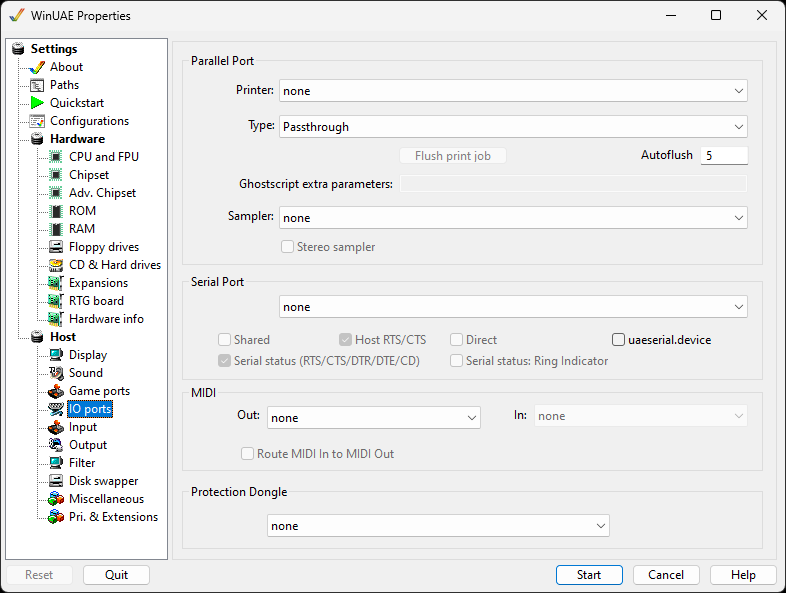
Parallel Port
Printer lets you specify which PC installed printer you
want to use for printing on the Amiga side.
Type can be Passthrough (the data is sent to the
printer unchanged), ASCII-Only for text only printing, Epson
Matrix Printer Emulation (9pin or 48pin), PostScript
(Passthrough) or PostScript (Emulation), which uses
Ghostscript. See Printing for
details.
Flush print job sends what has been printed so far to
the printer right away.
Autoflush is the time in seconds after which this
happens automatically.
Ghostscript extra parameters are additional
command line parameters to open Ghostscript with.
Sampler can be None or one of the recording devices
of your PC.
Stereo sampler is available if the sound
sampler has been selected.
Serial Port
The drop down menu allows which host port to use. All ports
including virtual ports on your PC will be available.
Shared will keep the port available for other
programs
Host RTS/CTS handshaking can be enabled if it's
required for modems or similar devices
Direct will fix PC to PC Lotus 2 serial link
problems
uaeserial.device for access to different types
of serial ports if a program requires it including multiple
ports and unit numbers.
Serial Status for handshake/status pin
emulation of RTS, CTS, DTR, DTE and CD.
Serial Status for handshake/status pin
emulation of Ring Indicator.
MIDI
Out specifies the MIDI output device
In specifies the MIDI input device
Route MIDI in to MIDI Out forwards all input
directly to the output device
Protection Dongle
Using the drop down list, one of the supported dongle types can be selected.