Pri. & Extensions
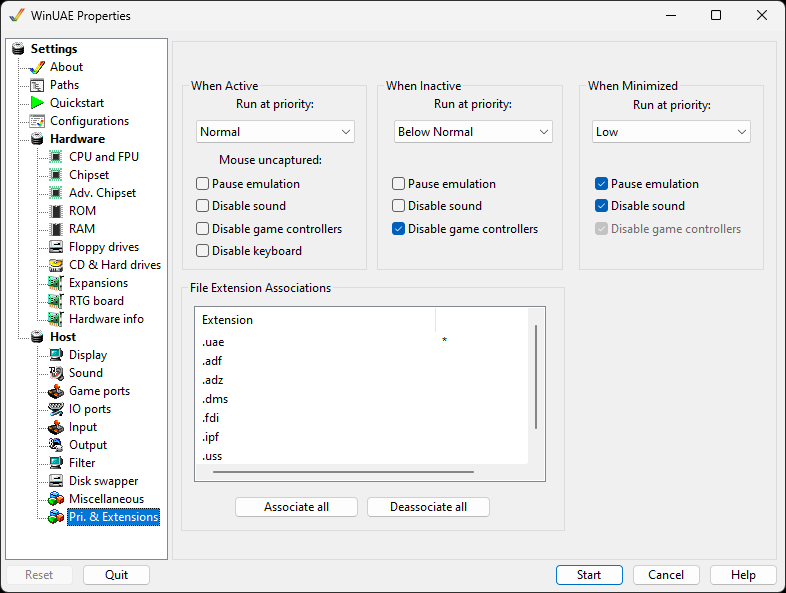
When Active
Run at priority Choose which priority
WinUAE should have when its window is active. Depending on
which other programs are running on the host, this should be
set to Normal or higher.
Pause emulation Pause the emulation if mouse
is uncaptured.
Disable sound Disable the sound if mouse is
uncaptured.
Disable game controllers Disable any game
controllers if mouse is uncaptured.
Disable keyboard Disable the keyboard if mouse
is not captured.
When Inactive
Run at priority Choose which priority
WinUAE should have when its window is in the background. To
save processing time, this should be set to Below Normal or
lower.
Pause emulation will completely halt
emulation
Disable sound turns off audio
output
Disable game controllers will disable inputs from game
controllers
When Minimized
These options are identical to the ones in the Inactive section, but they only apply when the window has been minimized, and isn't just in the background.
File Extension Associations
File associations enable double click functionality in Windows, and can be changed by either double clicking an entry in the list or using the Associate all and Disassociate all buttons. An asterisk indicates that the file extension is associated with WinUAE.
These extensions are known by WinUAE:
| Extension | Explanation |
|---|---|
| uae | Configuration file for WinUAE |
| adf | Amiga disk format image |
| adz | Amiga disk format image compressed |
| dms | Disk masher format image |
| fdi | Floppy disk image |
| ipf | Image preservation format |
| uss | UAE save state file |