Floppy Drives
Using this tab, you can "insert" disks into your virtual Amiga, and adjust floppy speeds.
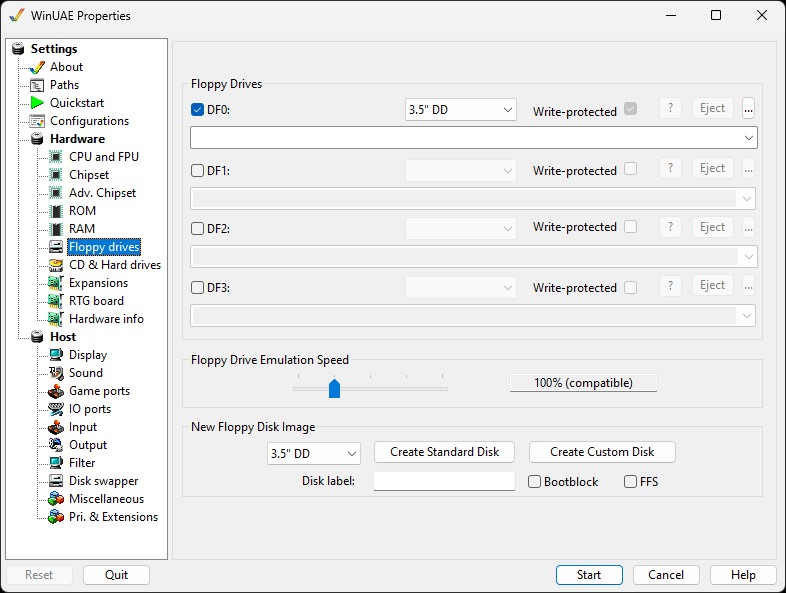
General
Up to 4 floppy drives can be enabled via the check marks and
will then be usable in the emulation.
Enable the Write Protected option to emulate
the write protect tab on your disk images.
Disable will disable the drive and free up
some memory (vital for old games). Note that
DF0 is the default drive to boot from, so
please use this before other drives.
Eject removes the disk from the drive.
Delete save image deletes the separate file in which
WinUAE keeps changes to disk images that it cannot write to
directly.
... buttons will show a file picker to insert
a disk image.
Floppy Drive Emulation Speed
The slider allows changing the emulated disk access speed, from Turbo, 100%, 200%, 400% or 800%. Turbo-floppy speed enables fast writing, and uses the maximum transfer rate from the media that the floppy image is accessed from, i.e. the host hard disk.
New Floppy Disk Image
Disk image size. 3.5" DD = 880KB, 3.5" HD =
1.76MB, 3.5" DD (PC) = 720kB, 3.5" HD (PC) = 1.44MB, 5.25" SD =
440kB.
Create Standard Disk creates a blank
ADF.
Create Custom Disk allows you to create a
special ADF file for saving games onto if the Standard disk
does not work.
Disk Label will label the new disk image
without having to do so in Workbench.
Bootblock will make the disk bootable.
FFS will format the disk using the Fast File
System.