RAM
These settings let you set up how much memory you will allocate for the Amiga side.
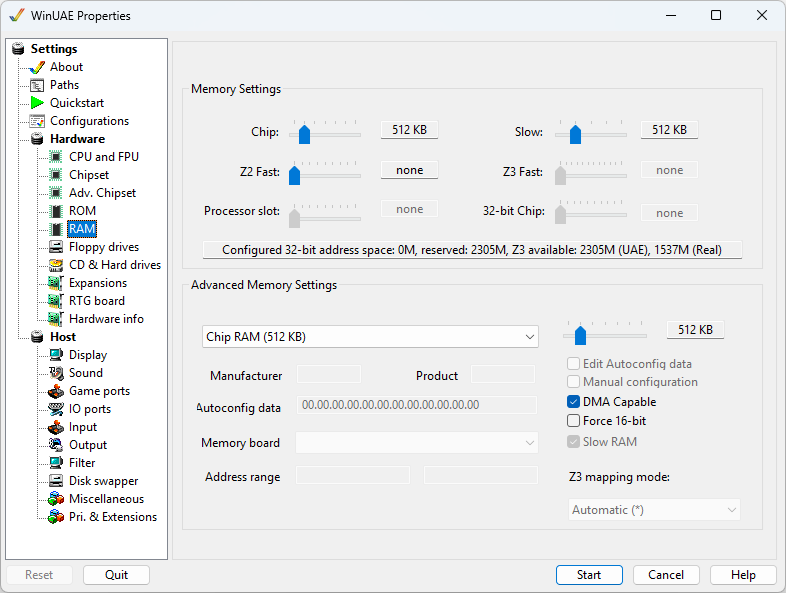
Memory Settings
Each slider controls the amount of respective memory to be
used. For an explanation of types of RAM, please see the
RAM page.
32-bit Chip allows adding additional Chip RAM
in the 32-bit address space. If the maximum of 1GB is
selected, UAE Z3 mapping is always used.
If a slider's memory is also used as accelerator board RAM,
changing it here adjusts the accelerator board memory
as well.
Advanced Memory Settings
The drop down menu offers selection for all
available RAM slots
Slider adjusts the amount of RAM for the
selected slot (256KB to 8MB)
Edit Autoconfig data Change the Manufacturer
code, Product code and Autoconfig data values.
Manual configuration Change the Address range
values.
DMA capable Enable Direct Memory Access
capability.
Force 16-bit Use 16 bit memory addressing.
Slow RAM Enable slow RAM (used by CPU and
Chipset).
Z3 mapping mode. Select Automatic, UAE or real
Zorro 3 mapping mode.
Manufacturer, Product, Autoconfig Data Display
data about memory board.
Memory board Select a UAE, DKB, GVP, Kupke, or 2
different Supra memory boards.
Address range Set address range for
memory.