CPU and FPU
These settings control the type of processor to emulate.
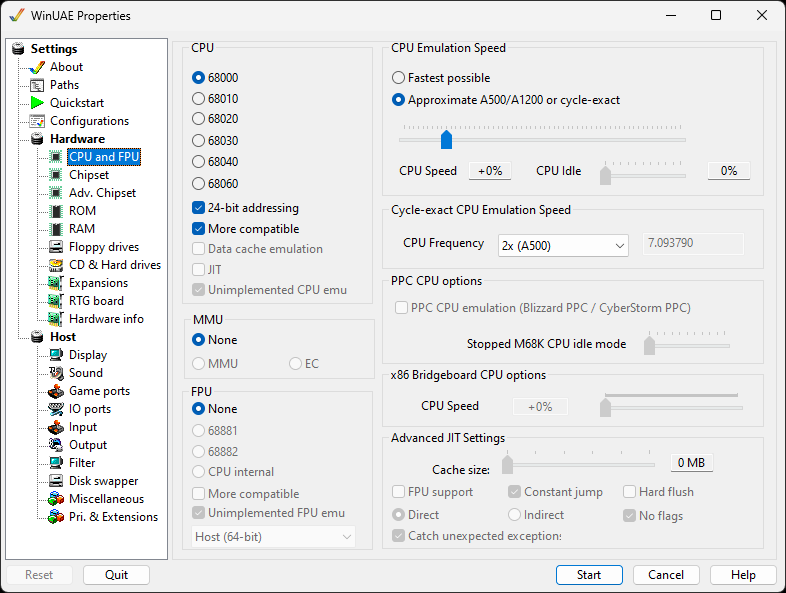
CPU
Choose between the classic Motorola processors:
- 68000 is the basic CPU type, as found in the Amiga 500, 1000, and 2000 models.
- 68010 is a slightly more advanced 68K member, but never actually shipped in a real Amiga.
- 68020 is a much more advanced 68K CPU, with some new instructions, and it has a fully 32-bit engine. Used in the A2500 for a brief period on the A2620 card. If 24 bit addressing is enabled, it is the same as the 68EC020 chip in the A1200.
- 68030 This is a mid range CPU used in the A3000 and the low end A4000s.
- 68040 is the top CPU provided with the A4000 desktop computer.
- 68060 is the top end CPU mainly provided on accelerator cards and the A4000T. It requires the 68060.library installed before using.
24 bit addressing is used mainly by the
68EC020 CPU such as the A1200.
More compatible emulates the CPU more exactly. Some
games and demos require this setting for proper
compatibility, but it is slower.
Data cache emulation Besides the instruction
cache, you can also emulate the data cache of the 68030 and
higher. Requires More compatible.
JIT can be enabled to access the Advanced Just
In Time settings if the 68020 or better is selected (see
below).
Unimplemented CPU emu lets the 68060 run the few
instructions a real 68060 does not have. On a real Amiga,
68060.library takes care of these.
MMU
MMU enables the Memory Management Unit of the 68030,
68040 or 68060 for operating systems like Linux on the
Amiga. EC emulates the cheaper EC variants of these
CPUs, which have no full MMU.
Neither is compatible with JIT.
FPU (Floating Point Unit)
- None No FPU is provided, this is the only option for the 68000 and 68010.
- 68881 Can be specified with the 68020 and 68030.
- 68882 Can be specified with the 68020 and 68030.
- CPU internal Can be specified for the 68040 and 68060.
More Compatible is available if a FPU is
selected. Some applications require this for proper
compatibility.
Unimplemented FPU emu does the same for FPU
instructions that the built-in FPUs of the 68040 and 68060
do not have.
FPU mode Host (64-bit), Host (80-bit) or Softfloat
(80-bit). Softfloat is the most accurate, but also the
slowest.
CPU Emulation Speed
- Fastest possible lets the CPU section of the emulation run as many cycles as possible, while still maintaining emulation of the custom chips at the appropriate rate. It is important to keep sound and graphics synchronized, no matter how fast the PC is
- Approximate A500/A1200 or cycle exact limits the CPU emulation to run the same number of cycles per vertical-blank as a standard A500 or A1200 would. In other words, for every 50Hz refresh of the graphics, the same number of CPU instructions will be executed as on a real A500 or A1200 computer.
CPU Speed lets you tweak the balance of
power between custom-chip emulation, and CPU speed. Some games
and demos require this setting to be adjusted. This setting is
the only CPU setting which can be changed once WinUAE is
running.
CPU Idle You can adjust the idle status of the
CPU with this slider. This feature can be useful on notebooks
to save battery.
Cycle-Exact CPU Emulation Speed
CPU Frequency will change the frequency multiplier for the CPU: 1x, 2x (A500), 4x (A1200), 8x, 16x or Custom.
PPC CPU Options
PPC CPU Emulation (Blizzard PPC / Cyberstorm
PPC) Enables the PPC emulation; a separate plugin is
required - see Expansions.
Stopped M68K CPU idle mode Sets level of idle
mode for the 680x0 processor
x86 Bridgeboard CPU options
CPU Speed set between 0 and 100% CPU speed of the bridge to an x86 board
JIT (Just in time) Settings
Due to the importance of the JIT engine and its complexity, it has its own page where you will find a description of its possibilities.