Display
These settings allow you to choose how WinUAE will display your Amiga-generated graphics.
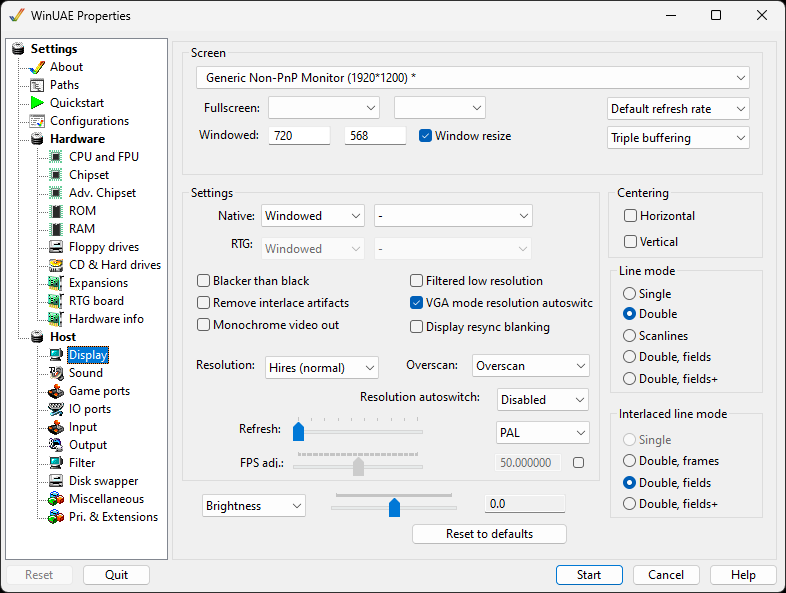
Screen
Primary Display driver Here, you can select
which screen or graphics card you can display your Amiga screen
on, useful if you have multiple monitors connected to your
system.
Fullscreen sets the full screen resolution
(see Settings), color depth and the Frequency (usually set to
screen Default).
Windowed This lets you change the resolution
used for the Amiga displayed in a Window on the PC screen.
Window resize allows window to be resized
after starting emulation. Hint: to keep the aspect
ratio, press CTRL while resizing the window.
Refresh rate can be set to default or one of the
rates your monitor supports.
VRR monitor Experimental option for variable refresh
rate monitors. Leave it unticked.
Buffering. Select type of buffering required:
No buffering, double or triple buffering.
Settings
Native Windowed, Fullscreen or Full-Window
with VSync setting.
RTG Windowed, Fullscreen or Full-Window with
VSync setting.
Blacker than black shows the blanked border darker
than black parts of the picture.
Remove interlace artifacts removes the flicker of
interlaced screens. Not compatible with all software.
Monochrome video out
Filtered low resolution gives a smoother picture when
the Amiga screen is shown at a lower resolution, instead of
dropping every other pixel.
VGA mode resolution autoswitch picks the right
resolution for VGA-like screen modes, keeping the picture in
shape.
Display resync blanking
Resolution can be set to Lores, Hires or Super
Hires.
Overscan can be set to TV (narrow, standard or
wide), Overscan, Overscan+ or Extreme.
Resolution autoswitch can be disabled, always
on, 10%, 33% or 66%.
Refresh rate will set how often the screen
will be updated. Useful on slower PCs or graphics cards.
PAL or NTSC to set the video
out mode
FPS adj is used to adjust the Frames per
Second to the display to speed up or slow down the display
(default is 50 fps)
Brightness, Contrast, Gamma and Dark palette fix can
be adjusted with the slider.
Reset to defaults is used to set these
settings back to defaults.
Centering
Checking the boxes will cause the Amiga output to be centered on the configured screen
Line mode
- Single draws every line once.
- Double draws every line twice. This allows interlace mode to be emulated nicely, but of course you also need a display that is twice as high.
- Scanlines will not draw certain lines, leaving them black.
- Double, fields and Double, fields+
Interlaced line mode
Line mode when output is interlaced: Single, Double, frames, Double, fields or Double, fields+.