Output
The Output tab allows you to record video and audio.
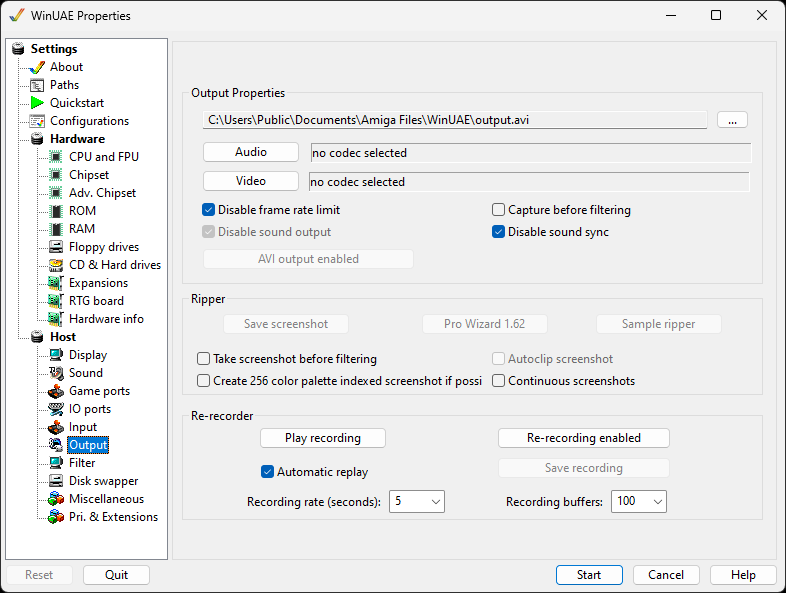
Output Properties
Output name of output file to save to.
Video type of video codec used to
create/compress the video file.
Audio type of audio codec used to
create/compress the audio data.
Disable frame rate limit removes any limits
when recording certain types of screen
Disable sound output - removes sound when
recording videos if not required
Capture before filtering - Capture audio or
video before filtering output
Disable sound sync disables sound sync with
video
AVI output enabled writes the output in Audio
Video Interleave (AVI) format
Ripper
Save screenshot saves a snapshot of what's
on the screen while emulation is running. There are Keyboard shortcuts to accomplish
the same.
Pro Wizard Rips music scores.
Sample ripper will sample sounds.
Take screenshot before filtering will capture
screen contents before any of the configured filters have been applied.
Create 256 color palette indexed screenshot if
possible
Autoclip screenshot will trim the picture to
output format
Continuous screenshots Screen shot taken on
every frame.
Re-recorder
This can allow you to Record and
Playback recorded input events saved with
WinUAE. They are saved as .inp files.
Automatic replay Allow auto-replay of the
recording.
Save recording Save a recording to an .inp
file.
Recording rate Set to 1 to 60 seconds.
Recording buffers Set buffer from 50 to
10000.